Last updated Mar 06, 2026 at 11:56pm
Okay, it was a lie we didn't make it work; It's been working for a while. But we are about to flood the internet with a simple solution and animated cursors without the use of JavaScript.
There's a bug report in Mozilla's tracker that has been open since 2009.
Bug #492237: "CSS animated cursors should work."
It's still open. In 2026. After 17 years. No modern browser animates any image format when you use it in a CSS cursor: url(). You get frame one. Just frame one. Forever.
We have a library of roughly 3,000 animated cursors — the glowing stars, the bouncing Pikachus, the Matrix rain, the little walking cats — and our users want to put them on their Tumblr pages and Neocities sites and personal blogs. The old way to do this was a JavaScript snippet that swapped cursor images at a set interval. It worked, technically, but it required a <script> tag, and on many platforms that's either blocked or just makes people nervous.
We wanted something that everyone can use. One simple piece of CSS code, just like how we always do it. Here's the story of how we got there.
Part 1: The JS Approach
The Dead End Everyone Tries First
The natural starting point is CSS. You have an animated GIF or a .ani file, you write cursor: url("my-cursor.gif"), and you expect it to animate. It doesn't.
It's not a modern browser-specific quirk. Chrome, Firefox, and Safari all behave the same way. GIF, APNG, animated WebP, SVG SMIL — none of them animate in a CSS cursor. The spec never required it, and no one has bothered to change that. IE was the only browser that really did animated cursors and now no one is using it.
So people reach for JavaScript. And the workaround most people land on is the follower div: set cursor: none on the document, create a <div> that follows mousemove, and style it to look like a cursor.
We tried it. It has one fatal flaw: inherent 1-frame input lag. The cursor position is always one frame behind where your actual pointer is. On a 60Hz monitor that's 16ms. On a 144Hz monitor it's 7ms. Either way, you can feel it. The cursor trails you. It felt wrong immediately — "too janky, and amateurish" was the exact phrase we wrote in our notes.
So that approach was also out.
The Actual Insight
Here's the thing about cursor: url() in CSS: it accepts data URLs. Including base64-encoded WebP images. Including very small ones, around 300–500 bytes per frame compressed.
What if we didn't try to animate an image at all — what if we just swapped the cursor property itself on every frame?
A cursor animation is, at its core, a list of images playing in sequence. If we pre-load all those images as base64 data URLs and cycle through them — updating the cursor property each time — the browser renders each frame natively, at native cursor position, with zero input lag.
That was the idea. Now we had to figure out the most efficient way to do it.
The Sprite Strip: One Request Instead of 200
We found the AnimatedWebCursors project on GitHub, which uses the same core frame-swapping technique. But it loads individual image files — one per frame, from a folder the user hosts themselves. An 8-frame cursor means 8 HTTP requests. A 200-frame cursor means 200.

The solution is a sprite strip: a single horizontal WebP image with all animation frames laid out side by side. An 8-frame 32×32 cursor becomes a single 256×32 image. A 200-frame cursor becomes a 6400×32 image. One HTTP request. All frames load atomically — either the whole strip loads or nothing does, so there's no partial-animation flicker.
On load, a <canvas> element slices it into individual frame data URLs:
var img = new Image();
img.crossOrigin = "anonymous";
img.onload = function() {
  var c = document.createElement("canvas");
  c.width = fw; c.height = fh;
  var ctx = c.getContext("2d");
  var frames = [];
  for (var i = 0; i < n; i++) {
    ctx.clearRect(0, 0, fw, fh);
    ctx.drawImage(img, i * fw, 0, fw, fh, 0, 0, fw, fh);
    frames.push(c.toDataURL("image/webp"));
  }
  // ... start animation
};
img.src = strip;
One canvas element is reused for all N frames — we overwrite it each loop rather than creating N separate canvases. Less garbage collection pressure during initialization.
img.crossOrigin = "anonymous" is required because of the canvas security model: drawing a cross-origin image onto a canvas and then calling toDataURL() will throw a SecurityError unless the image was fetched with CORS. The CDN responds with Access-Control-Allow-Origin: * and the canvas is no longer tainted.
The strip itself is WebP. canvas.toDataURL("image/webp") produces data URLs that are 43% smaller than PNG (1,788 vs 2,567 characters per frame on average). A typical 8-frame 32×32 strip is 5–15 KB.
Five JavaScript Approaches, Benchmarked
Once frames are in memory as data URLs, we had to find the fastest way to cycle them. We tested five different implementations. Everything was measured with Chrome's Task Manager on the same machine, running the same 8-frame 32×32 cursor at 10 FPS.
Approach 1: requestAnimationFrame with a frame-rate limiter
function tick(ts) {
  if (ts - last >= interval) {
    document.documentElement.style.cursor = val[cur++ % n];
    last = ts;
  }
  requestAnimationFrame(tick);
}
The problem: rAF fires 60–120+ times per second depending on your monitor's refresh rate. Even with the limiter, you're calling the function constantly and doing nothing most of the time. Those no-op calls add up. CPU: 1.7–1.8%. Worse than a simple setInterval.
Approach 2: Rewriting the stylesheet's textContent
styleTag.textContent = `html { cursor: url("${val[cur]}") 0 0, auto; }`;This is the worst approach. Every frame swap forces the browser to re-parse the entire stylesheet. CPU: ~2.6% on our 200-frame stress test. Don't do this.
Approach 3: Class toggle with pre-built CSS rules
Pre-build N CSS rules, one per frame, with class selectors. Toggle the class on <html> to advance frames. Better than rewriting textContent — no re-parsing — but the browser still has to match a selector on every toggle. CPU: ~2.2%.
Approach 4: Direct inline style assignment with setInterval — the winner
var cur = 0;
var val = [];
for (var i = 0; i < n; i++) {
  val.push('url("' + frames[i] + '") ' + hx + ' ' + hy + ', auto');
}
document.documentElement.style.cursor = val[0];
setInterval(function() {
  cur = (cur + 1) % n;
  document.documentElement.style.cursor = val[cur];
}, 1000 / fps);
No stylesheet manipulation. No selector matching. setInterval fires exactly N times per second — no wasted calls. Pre-built cursor value strings in an array means zero string concatenation in the hot loop. CPU: 1.1–1.2%.
| Approach | CPU (active) | Notes |
|---|---|---|
| Follower div | — | Input lag, rejected |
requestAnimationFrame | 1.7–1.8% | 50+ no-op calls/sec. Worse than setInterval. |
textContent rewrite | ~2.6% | Re-parses stylesheet every frame. Worst. |
| Class toggle + pre-built rules | ~2.2% | Better, still slower than direct style. |
| setInterval + direct inline style | 1.1–1.2% | Winner |
For comparison: YouTube background music ≈ 1.2% CPU. These numbers are on a simple test page — on real-world sites with more DOM complexity, CPU usage will be higher.
The 200-Frame Stress Test
Once we had the efficient approach working, we wanted to know the ceiling. "Lights Of Heaven" has 200 frames, 32×32 pixels, running at 15 FPS. We ran it with Chrome's Task Manager open.
Result: 2.1–2.3% CPU. Less than twice the YouTube baseline. For a cursor with 200 frames playing at 15 FPS. That was the green light.
The full embed code for the JS approach. The six parameters at the top are the only things that change per cursor — everything else stays identical:
<script>
(function() {
  var strip = "https://example.com/image/strip.webp"; // URL to the sprite strip
  var fw = 32;  // frame width in pixels
  var fh = 32;  // frame height in pixels
  var n  = 10;  // total number of frames
  var hx = 0;   // hotspot X (click point)
  var hy = 0;   // hotspot Y (click point)
  var fps = 12; // animation speed
  var img = new Image();
  img.crossOrigin = "anonymous";
  img.onload = function() {
    var frames = [];
    var c = document.createElement("canvas");
    c.width = fw; c.height = fh;
    var ctx = c.getContext("2d");
    for (var i = 0; i < n; i++) {
      ctx.clearRect(0, 0, fw, fh);
      ctx.drawImage(img, i * fw, 0, fw, fh, 0, 0, fw, fh);
      frames.push(c.toDataURL("image/webp"));
    }
    var st = document.createElement("style");
    st.textContent = 'a,button,input,textarea,label,[role=button]{cursor:inherit!important}select,option{cursor:auto!important}';
    document.head.appendChild(st);
    var cur = 0;
    var val = [];
    for (var i = 0; i < n; i++) {
      val.push('url("' + frames[i] + '") ' + hx + ' ' + hy + ', auto');
    }
    document.documentElement.style.cursor = val[0];
    setInterval(function() {
      cur = (cur + 1) % n;
      document.documentElement.style.cursor = val[cur];
    }, 1000 / fps);
  };
  img.src = strip;
})();
</script>
The strip for a 10-frame 32×32 cursor is a single image that's 320×32 pixels — all frames laid out left to right. The canvas slices it by stepping i * fw pixels across for each frame. So frame 0 reads pixels 0–31, frame 1 reads 32–63, frame 2 reads 64–95, and so on.
| Parameter | What it means | Example |
|---|---|---|
strip | URL to the horizontal WebP sprite image | "https://cdn.../nyan-abc123.webp" |
fw | Width of one frame in pixels | 32 |
fh | Height of one frame in pixels | 32 |
n | Total number of frames in the strip | 10 |
hx | Hotspot X — which pixel is the "click point" | 0 for arrow, 16 for crosshair |
hy | Hotspot Y | 0 for arrow, 16 for crosshair |
fps | Animation speed in frames per second | 12 |
No external CSS needed — the script injects its own <style> tag at runtime. Paste it anywhere on the page, done.
Part 2: Our Users Prefer CSS
No JS? No Problem. Why We Went Purely CSS Anyway
The JS approach worked great. Benchmarked, optimized, ready to implement site wide. Then we thought about where people actually use this.
Neocities free tier blocks external scripts via Content Security Policy. <script src="..."> is completely dead there for free accounts.
Beyond the CSP issue — a lot of users in this space are nervous about pasting <script> tags into their websites. That's completely fair. JavaScript can do anything. A stylesheet can only style things.
What if the embed code was just a <link> tag?
A 2016 Stack Overflow answer had pointed in the right direction years earlier: pure CSS @keyframes animating the cursor property with step-end timing. The technique was known. Nobody had automated it at scale. Here's what the generated CSS looks like (frames truncated):
@keyframes cursor-anim {
  0.00%  { cursor: url("data:image/webp;base64,UklGRpwC...") 20 20, auto; }
  9.09%  { cursor: url("data:image/webp;base64,UklGRn4C...") 20 20, auto; }
  18.18% { cursor: url("data:image/webp;base64,UklGRowC...") 20 20, auto; }
  /* ... one keyframe per frame ... */
}
html { animation: cursor-anim 1100ms step-end infinite; }
a, button, input, textarea, label, [role=button] { cursor: inherit !important; }
step-end timing. CSS animations normally interpolate between keyframes. step-end tells the browser to jump instantly to each keyframe value at its boundary with no interpolation. That's exactly how a cursor animation should work.
Hotspot coordinates. The 20 20 after each data URL is the cursor's hotspot — the pixel that counts as the "click point." An arrow cursor's hotspot is 0 0 (the tip). A crosshair's is dead center. We read these directly from the original .ani file's binary data and bake them into every keyframe.
Per-frame timing. .ani files store the display duration for each frame individually (in "jiffies" — 1/60th of a second units). We preserve those per-frame durations in the keyframe percentages. Some frames are fast, some slow — the timing is maintained exactly from the original file.
cursor: inherit !important. Without this, browsers apply their default cursors to links, buttons, and inputs. The !important overrides that. select and option are explicitly excluded — OS-rendered dropdowns are outside the DOM and can't be overridden anyway.
Why Base64 Instead of Image URLs
The obvious alternative is to reference frames as external URLs — cursor: url("https://cdn.../frame1.webp"). We went base64 for the CSS approach, and it's worth explaining why.
The big win: zero extra HTTP requests. With base64, the entire cursor animation — every frame — loads in a single CSS file request. The browser parses the stylesheet and all the image data is already there. No round-trips, no waiting for frames to trickle in, no flicker. For an embed meant to work on Tumblr and Neocities, atomic loading matters.
Instant cache behavior. Once the CSS file is cached, the cursor loads in zero time on every subsequent visit. With external image URLs, the CDN has to respond for each frame before the animation can start — or you'd need to preload them all, which is complexity the user has to manage.
The honest cost: file size. Base64 encoding inflates binary data by 33%. A frame that's 600 bytes as raw WebP becomes ~800 bytes as base64. An 8-frame cursor at 32px is small — the CSS file is typically 15–40 KB. A 200-frame cursor at 128px can be several hundred KB or more. That's the trade-off: bigger file, but everything in one place.
We chose WebP over PNG to claw some of that size back — WebP base64 is 43% smaller than PNG base64 for the same frame (1,788 vs 2,567 characters per frame on average). The JS sprite strip approach goes the other direction: one small binary WebP file, no base64 overhead. That's more efficient for large frame counts. But for the CSS-only embed — a single <link> tag with no moving parts — base64 is the right call.
The Pipeline
Every .ani file that comes through our system now goes through this process:
- Python parses the RIFF binary structure, extracting individual frames, per-frame durations, and the hotspot coordinate
- Each frame is scaled to the target size — we generate 5 sizes: 32, 48, 64, 96, and 128px
- Frames are encoded as lossless WebP base64
- The CSS file is generated with the
@keyframesblock, thehtml {}animation rule, and the inherit overrides - Uploaded to CDN
The end user gets:
<link rel="stylesheet" href="https://cdn.cursors-4u.net/cursors/animated/animated-nyan-cat-rainbow-c493f1ef-32.css">That's it. Paste it in <head>. The cursor animates. Click on the .css to see what it looks like.
Why Stylesheets though?
Why not have the entire css code in a textarea for users to just copy and paste? We could do that, but then it becomes a potential 1.5MB (200 frames at 32x32) data jumbo mess. So instead we thought of the style sheet instead. If your page is not being cache, pasting a 1.5MB of data for your user to download every time someone visits is an horrible idea. What we did instead is put it in a style sheet, and let CloudFlare cache and compress it. It stays cache for a year. No redownloading the same 1.5MB on the page over and over again. Most cursors will never reach that size. They sit around 15kb or less.
Why This Hadn't Been Done Before
The individual pieces here aren't new. @keyframes has existed since CSS3. Data URLs have been around forever. Sprite strips and canvas slicing are standard techniques.
What's new is doing it automatically, at scale, correctly. We have roughly 3,000 animated cursors, each generating 5 CSS files — about 15,000 cursor stylesheets in total. Each one has the right hotspot, the right per-frame timing from the original binary file, and five size variants. That automation — parsing .ani RIFF binaries, scaling frames, computing proportional hotspots, generating the timing math — is where the actual work was.
No other cursor site we've found does this. Most are still serving follower-div embed codes from 2008, or don't offer animated embeds at all.
Why Browsers Won't Fix This
You'd think after 17 years, someone at Mozilla or Google would just fix it. The CSS Basic User Interface Module Level 4 says browsers "SHOULD" support animated image formats in cursor: url(). Not "MUST" — "SHOULD." That single word is doing all the heavy lifting. It's a polite suggestion, and every browser vendor has politely ignored it.
Mozilla's Bug #492237 has been open since 2009. The last meaningful technical comment was in 2017: making this work would require changes to nsWindow::SetCursor on every platform — native OS windowing code for Windows, macOS, and Linux. Not a CSS tweak. Platform-level plumbing that nobody has volunteered to touch. The bug sits at P3 priority with 5 votes.
Chromium's Issue #41031275 is different but related: even changing cursor: url() via JavaScript while the mouse is sitting still doesn't visually update the cursor until the user physically moves the mouse. The OS cursor subsystem only repaints on mouse movement events. Last activity: June 2022.
WebKit actually fixed their version of the stationary-cursor bug in January 2011. Safari's been ahead on that front for 15 years — but it still won't animate a GIF or WebP cursor natively.
The architecture problem. When you set cursor: url(image.webp), the browser hands that image off to the operating system's cursor subsystem. The OS renders it at the compositor level — bypassing the browser's rendering pipeline entirely, which is why native cursors feel instantaneous. The bad part: the OS expects a static bitmap. It doesn't know what a WebP animation loop is. Making this work natively would require driving a frame loop at the OS cursor level, reaching into platform-specific cursor APIs on Windows, macOS, and Linux. Nobody on any browser team has decided that's worth doing.
The unfocused window quirk. In Chrome, when your mouse is hovering over a window you haven't clicked into, CSS animations keep running — but the OS cursor bitmap doesn't repaint without a mouse movement event (Chromium #41031275). The cursor looks frozen when stationary, then snaps to the correct frame the instant you move. Safari doesn't have this problem. We chose zero input lag and native cursor feel over pixel-perfect behavior in that edge case.
Mozilla Bug #492237 is still open. Until browsers fix it — and they won't anytime soon — this is the way.
The Honest Limitations
- 128×128px hard browser cap. All major browsers silently ignore cursors larger than this.
- File size for long animations. A 200-frame cursor at 128px can be several hundred KB of CSS. The JS strip approach is more bandwidth-efficient for extremely long animations.
- Always looping. The animation keeps running even when your cursor leaves the window. CPU impact is negligible, but worth knowing.
- Dropdowns.
selectandoptionelements can't show custom cursors — they're rendered by the OS, not the browser. - Stationary cursor in unfocused Chrome windows. The animation appears frozen when the mouse isn't moving. Resolves the instant you move the mouse. Safari doesn't have this issue.
- The CPU usage on our Chrome test was 1.7% no movement. Not as good as JavaScript.
What's Next For Us
Right now, getting an animated cursor onto your page means picking one from our library, hitting the Get HTML/CSS Code button, and pasting the <link> tag into your site. That works today — go try it.
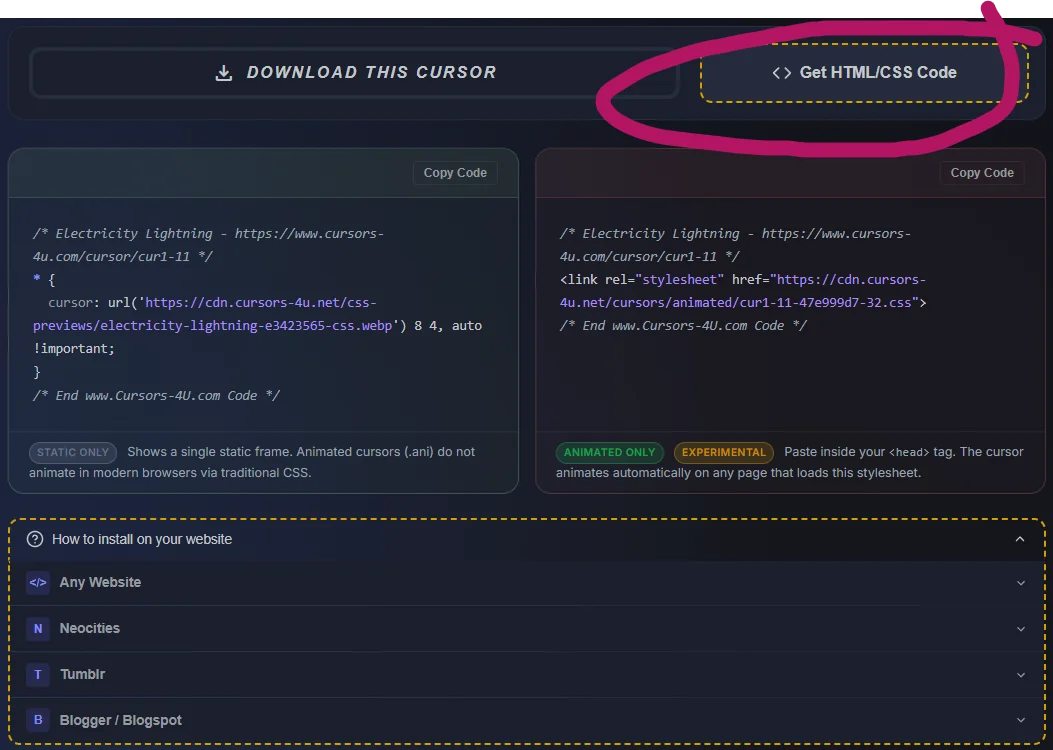
But we're also building something that takes this further: a cursor editor that runs entirely in the browser. Draw your cursor frames, set the timing, adjust the hotspot — and when you're done, hit Export. It outputs the base64 CSS block directly, ready to paste. No uploading a file. No waiting for a pipeline to process it. You design it, you get the embed code immediately.
We're still using images under the hood — the editor works with the same WebP frames that power the rest of the library. But the point is that you never have to think about that. You just make something, and the code is there.
The whole pipeline we built — the RIFF parsing, the hotspot math, the per-frame timing, the base64 encoding — all of it moves into the browser. The CSS file it generates will be identical to what our server produces today. It just won't need a server to do it.
For now, browse the library, find a cursor you like, and click Get HTML/CSS Code. The animated <link> embed is live and working on every animated cursor in the collection.
References
- Mozilla Bug #492237 — "animated images in CSS cursor should animate" — Open since 2009
- Chromium Issue #41031275 — cursor doesn't update when mouse is idle
- WebKit Bug #14344 — resolved fixed January 2011
- CSS Basic User Interface Module Level 4 — cursor property spec
- CSSWG Issue #4441 — discrete property transitions, resolved December 2022
- Stack Overflow — Animated cursor support in web applications — 2016 answer describing the
@keyframestechnique - Jordan Eldredge — Rendering Animated .ani Cursors in the Browser
- alienmelon/animatedWebCursors — JS cursor library using individual image files
Comments