Last updated May 08, 2026 at 06:27am
April was a heavy build month — and there's one new feature that's specifically meant for you: Remixes. Now you can see when a cursor is a variation of another, and browse the whole family in one click. Here's a quick look at what's live, plus a recap of the rest of the work that landed this past month.
Remixes Are Here
Have you ever found a cursor on Cursors-4U and thought "this is great, but I'd love it in a different color"? Or downloaded a pack, recolored it for your own theme, and wished there was a way to share it back without losing the credit trail to the original artist? That's exactly what Remixes are for.
A remix is a cursor that's officially marked as a derivative of another cursor on the site. When the relationship is set, three things happen automatically:
- The remix shows an "Original" badge with a thumbnail of the cursor it came from. Click it to jump to the source.
- The original cursor's page gets a "Remixes" pill linking to a gallery of every variation made from it.
- Multi-step lineages stay readable — if a cursor is a remix of a remix, both the direct parent and the original at the top of the chain are shown side-by-side with a clear arrow between them. Credit doesn't get lost as the family tree grows.
You can already see this live on Cool Blue Pointer — 27 colorways and glow variants are now linked together as one connected family. If you've made remixes of cursors on the site and want them connected to the originals, get in touch and we'll wire them up. Parent cursors get a remix page where you can just append /remixes to the end of URL. I am manually added in these remixes, so it will take a bit to show up on the website.
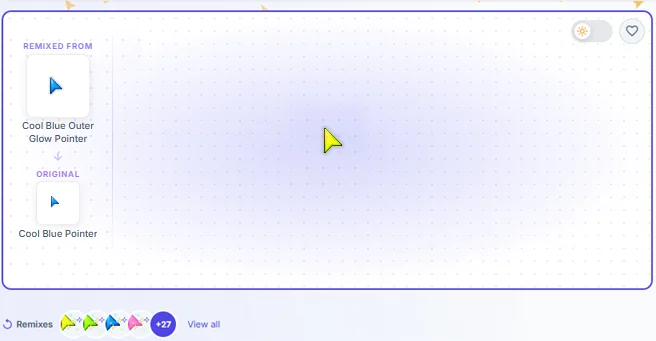
The eventual idea here is to have remixes work with the Editor as well. Drag one cursor into the editor and be able to remix it. Something like that.
The Cursor Editor Is Almost Ready
Most of April went into the browser-based cursor editor that's coming later this month. Quick refresher: it's a full drawing tool that runs in your browser, lets you paint cursors frame-by-frame, and exports .cur, .ani, and full Windows cursor sets — no software installs, no Photoshop, no command line.
What landed this past month:
- Real export pipeline — single static cursors, animated cursors, PNG sprite sheets, and full ZIP cursor sets with the install file already inside. Just unzip, right-click install.inf, install. Done.
- Multi-size import — drop a multi-size .cur or multi-frame .ani into the editor and it now reads every size and frame, not just one.
- Better drawing — brushes, selections, drawing inside selections without bleeding outside, non-destructive rotation previews so you can spin a frame around without committing to a destructive transform.
- Cleaner timeline — frame thumbnails so you can actually see what each frame is, the timeline collapsed into one tight strip, settings inline instead of tucked away.
- Better workspace — wheel zoom, a zoom chip showing the current scale, an inline workspace list to hop between projects, and a select-all shortcut.
- In-app docs — a 17-page handbook covering getting started, drawing tools, importing images, exporting cursors, troubleshooting, and more.
The editor is still in active development but the core export workflow is solid. We're targeting public release later in May.
Multi-Size Animated Cursors Went Live
Animated cursors (.ani files) historically only carried one size, which meant Windows had to scale them up or down to fit your DPI — fuzzy on 4K screens, blocky on small monitors. We landed multi-size animated cursors this month. New .ani exports from the site can carry multiple sizes in a single file, and Windows picks the closest one for your display. The newest animated cursors will come packed in a zip like below...
- Default:
32,48,64 - Large:
72,96,128 - Extra Large:
256
If everything was coded right, 3 sizes max instead of 6.
So if you're on a high-DPI laptop, the cursor stays crisp. On a 1080p monitor, it stays clean. No more "everything's a little blurry." Animated preview thumbnails were also fixed — they now use a clean 96×96 canvas with proper padding so the previews you see while browsing match the cursor you actually download.
Better Linux Cursor Support (Still In Private Testing)
If you've been waiting to import Xcursor themes from Linux, the import path is now smoother:
- .7z archives now accepted alongside .tar.gz and .zip. Most modern Xcursor packs ship as .7z.
- License files bundled in exports — GPL and Creative Commons are now first-class license options, and downloads of copyleft-licensed cursor sets include LICENSE.txt and COPYRIGHT.txt automatically inside the ZIP.
If you've got a favorite Xcursor theme you've been wanting to bring over from Linux, the path is now smoother.
A Faster Site
A bunch of behind-the-scenes work this month made everything load faster:
- Smarter cache invalidation — pages refresh when something actually changes that affects them, and stay cached the rest of the time. Big reduction in unnecessary cache work and faster page loads on first visit.
- Cloudflare integration improvements — the classic mirror at old.cursors-4u.com now properly purges in sync with the main site, so pages stay fresh for everyone.
- Cleaner cursor file URLs — downloads now use the cursor's actual title in the filename, so when you save a cursor your downloads folder shows "Cool Blue Pointer.cur" instead of a random hash.
Security/Server Improvements
I upgraded, to Cloudflare Pro and got some minor speed boost for the website. I also made some security improvements with CF as well as the server. If you feel the site is faster or slower, leave a comment.
What's Coming Next
- Editor public release — late May.
- Remix discoverability — once more cursors are linked, we'll surface remix families in browse and search.
- More format support — investigating broader Linux compatibility and a few formats from older cursor tools.
Until then: explore the new remix family at Cool Blue Pointer, and let us know what you'd like to see next. If you spot anything off — a remix that should be linked, a cursor showing wrong, a download that doesn't behave — drop us a note. The site moves fast and we'd rather hear about a bug than not.
Comments