Last updated Feb 03, 2026 at 03:12am
4/1/2013 - CURSORMANIA IS NO LONGER IN BUSINESS
Hello, this a review of the program by Mindsparks Interactive, called CursorMania or Cursor Mania. If you have been searching for cursors, you probably came across this program. The program is part of a line of products that installs a toolbar called MyWebSearch. There have been many questions regarding the safety of this product but today I will ignore all that and review the product only. My next post will dwell into the spyware, adware, malware, virus aspect.
For this tutorial/guide/review I have installed a fresh couple of CursorMania. So everything that I show is the current version of the program.
Installation
During the install process it will ask you if you want to make MyWebSearch, the default search engine, as well as the homepage. Also it will ask you to install Norton Internet Securities. That is up to you what you want to do.
So when you install CursorMania, you should get a new toolbar on your Browser. I believe CursorMania works on Mozilla and Firefox only. The toolbar looks something like this...

Along with Cursor Mania you also get Smiley Central, Screensaves, and MyFunCards. One other thing to note, is that along with the toolbar that is installed, you will also get some new startup items during the Windows boot. These items as they appear on msconfig are...m3SrchMn, and mwsoemon. I do not know what these processes do, but from installing toolbars of other products in the pass, none of them have installed any thing else in the Windows StartUp.
Usage
So to use the cursors on Cursor Mania, click on the "Cursor Mania" button on the toolbar and something like this will appear.
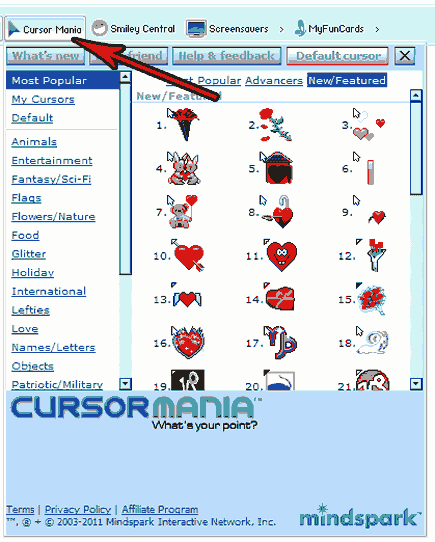
This "Cursor Box" can only be accessible from a browser. So if you want to change your cursor through Cursor Mania, you have to open up a browser with the toolbar installed on it.
Cursor Mania claims to have almost 14,000 cursors which is a whole lot of cursors. I can not honestly verify how much they have, but I definitely believe they have 10,000+ cursors.
Because of Intellectual Property rights, they are not allowed to have cursors of Celebrities, Movies, anything that is pretty much copyrighted and having required paying a royalty fee (I assume). Because when I browse through the selection, I can't seem to find any of those types of cursors.
There are a lot of glittery, animated cursors. Most of the cursors are very colorful and fun to look at. Many of them are cute. All of them seem to be designed to work for Windows XP. But all of them are 256 Colors only. No alpha transparency in any of these cursors. Here are a few categories that they have, Animals, Entertainment, Fantasy, Flags, Food, Holiday, Lefties, Love, Objects, and many more. There are also sub-categories in each of the categories. There appears to be no search function though so finding cursors are a hard thing. However, each cursor that you use, is saved in the "My Cursor" history. At any point in time, if you do not want to use any of the cursors, you can revert to the "Default" Windows cursors.
Cursor Mania does not have any schemes or sets. This means, that Cursor Mania will only replace the "Default" pointer. The other cursors, such as Text Select, Alternate Select, Diagonal Resize, Link Select, etc are not changeable.
Removal
You can remove Cursor Mania by going to the Control Panel and choosing "Add/Remove". Look for "MyWebSearch (CursorMania)" and click on remove.
However this does not remove everything in the registry. You'll have to manual remove or use a malwareantibytes or superantispyware. Since these two scanners consider Cursor Mania malware or spyware.
Conclusion
Cursor Mania is the largest toolbar program in the world with the most selection and cursors. With 10,000+ cursors you can change one cursors everyday for the next 30 years. Changing cursors is only one click away. There's no need to go through the windows mouse settings to change cursors. I'm going to finish up this guide with a pros and cons list.
Pros
- Easy install
- 10,000+ Cursors
- You also get smiley central, screen savers, and fun cards
Cons
- Requires browsers installation to use
- Installs questionable windows "Start Up" processes
- Some companies considers this program, a threat to privacy.
- Many negative reviews and people claiming it's malware and/or a virus.
Comments