Tumblr Twitter      HELP     SITEMAP     DONATE     SUBMIT     RSS       
Cursors
Fav Of The Month
Black Moustache
Being Viewed
Adventure Time - Finn 3Dangling Green HeartsWorld Of Warcraft, WoW Short SwordBlue Wings - LoadingThe Infamous Middle FingerLights Of Heaven SetS Pink Premium PointerSpermMini Rage Face Blush Smiley
Added: 31 Mar 2009 / Views: 66573
download Rate This Cursor


template template
download Cursor Download And Information
Zamorak Godsword - RuneScape Created By: Runescape, Jagex Ltd
Cursorized By: Cursors-4U.com
Rating:
4.4 out of 5 with 2433 votes.
Category(s): MMORPG, Runescape, Swords
Download Zamorak Godsword - RuneScape Cursor
template template

downloadOption #1 - Universal CSS/HTML Code

This CSS/HTML Code of Zamorak Godsword - RuneScape works on almost every website or web page on the internet that allows, CSS and HTML coding. Like forums, normal web page etc.

downloadOption #2 - CSS Style Sheet Only Code

Option #2 is for website owners who are allowed to edit their CSS style sheet. Paste this at the bottom of your style sheet. If you don't know what CSS style sheet means, then use the above code.

downloadTumblr Cursors

The Zamorak Godsword - RuneScape Tumblr Cursor will work on your page if you follow these instructions...
  1. Login and go to your Tumblr page.
  2. Click on Customize
  3. Click on "Advance"
  4. Under the "Add Custom CSS" textarea box paste the following at the very bottom and save.

downloadTumblr Cursors Option #2

If the above instructions did not work for you, try this option and it should work.
  1. Login and go to your Tumblr page.
  2. Click on Customize
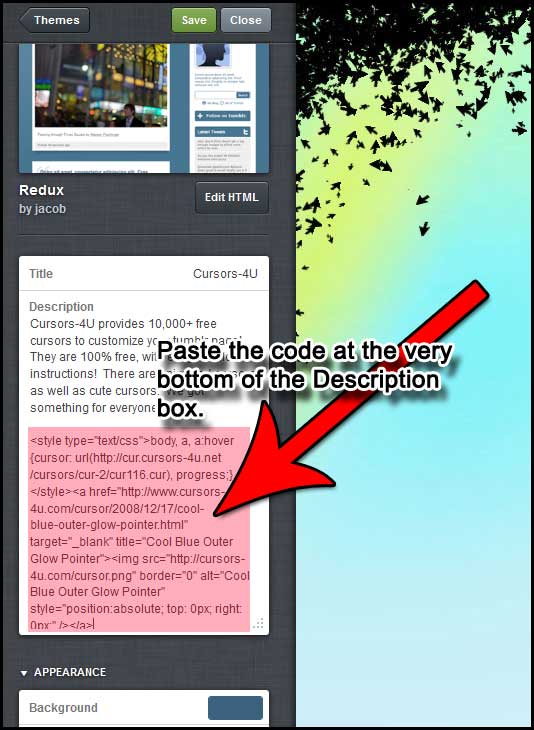
  3. Under "Description", paste the following code at the very bottom of your description box.

downloadTumblr Cursors Option #3

If the other two options do not work,
  1. Login and go to your Tumblr page.
  2. Click on Customize
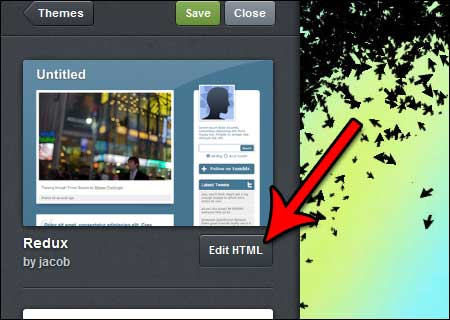
  3. Click on Edit HTML
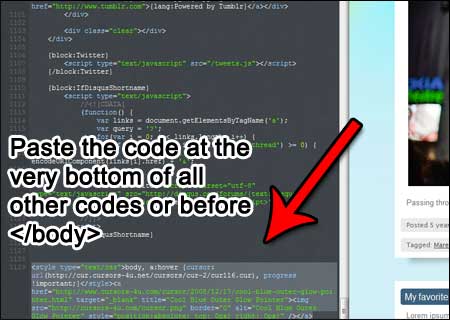
  4. At the very bottom paste the following code.
  5. At the top click on "Update Preview". Did the cursor show? If not leave a comment.
  6. If the cursor is there, click on "Appearance" then click on "Save".

downloadOld Blogger/Blogspot Interface

The Zamorak Godsword - RuneScape cursor will work if you are using the old interface for blogger/blogspot and if you follow the instructions below...
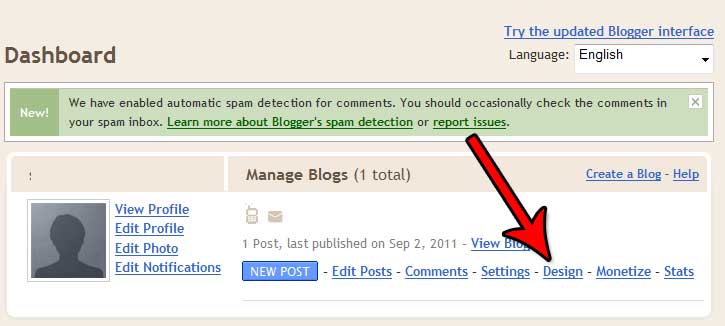
  1. Log in and go to your account dashboard.
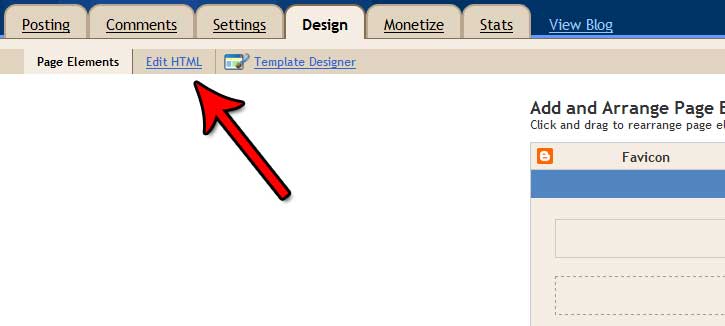
  2. Click on "Design"
  3. Next click on "Edit HTML"
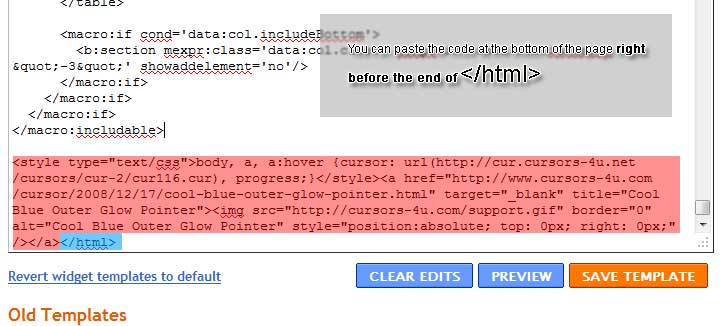
  4. Next paste the below code at the bottom of the html box.

  5. Save Your Profile

downloadNew Blogger/Blogspot Interface

The Zamorak Godsword - RuneScape cursor will work if you are using the new interface for blogger/blogspot and if you follow the instructions below...
  1. Log in and go to your account dashboard.
  2. Click on "Template"
  3. Next click on "Edit HTML"
  4. Next paste the below code at the bottom of the html box.

  5. Save Your Profile

downloadFacebook Cursor

Facebook does not allow CSS styling on their website. You have to use an external application that will modify your page for you. There is no such application except CursorMania. However CursorMania was not design as a facebook application but a general desktop toolbar Application. CursorMania may have a Zamorak Godsword - RuneScape in their system. But I am not positive.

Facebook Zamorak Godsword - RuneScape

If anyone has a Facebook application they want to share with us or develope for us. Send us an e-mail. Thank you.
On 24 Jan 2010 - 08:07, dude ur on fire Wrote:
HELLP ME OUT I DONT HAVE APPLY ANYWHERE AND I GOT A PC
On 24 Jan 2010 - 07:54, dude ur on fire Wrote:
mine doesnt have MOUSE in control panel and it frickin sucks
On 23 Jan 2010 - 19:58, dude ur on fire Wrote:
this is annoying i cant find apply on here please help me out i rlly want a gs for a cursor
On 23 Jan 2010 - 19:18, dude ur on fire Wrote:
omg i cannot find it it doesnt say apply either pls post AS SOON AS POSSIBLE
On 12 Dec 2009 - 21:03, jose Wrote:
hey
On 11 Dec 2009 - 14:29, lol Wrote:
this is super awsome thank you very much i have respect for u
On 20 Nov 2009 - 06:27, I WILL NOT TELL Wrote:
Thanks This is sick
On 6 Nov 2009 - 03:42, jere Wrote:
how i get this in runescape
Reply By Tor (Admin):
See that red "Download" image? Right click it and choose "Save Link As.." for Firefox, or "Save Target As..." for IE.
On 17 Oct 2009 - 12:06, craig Wrote:
is there a way i can just have this for my regular coruser for my comp so how do i do it
Reply By Tor (Admin):
Yes, please read the comments.
On 5 Oct 2009 - 14:39, Saywah on RS Wrote:
Thanks for the cool cursor and instructions on how to install it lol
On 27 Sep 2009 - 19:59, john Wrote:
when i do this a page pops up with words on it
Reply By Tor (Admin):
Right click on the download image and choose "Save Link As..." for mozilla firefox, or choose "Save Target As..." for IE.
On 18 Sep 2009 - 14:27, ballbammer Wrote:
your right well obviously now i have a zammy gs as my cursor pointer thanks for the advice
On 12 Sep 2009 - 12:27, arne Wrote:
how i invert it to a cursor please mail me arnehutsebaut hotmail com
On 9 Sep 2009 - 14:34, wont work Wrote:
it says i have to make an association what does that mean
On 29 Aug 2009 - 01:32, Help me Wrote:
Dude i dont know how to get it help me please im cliclking on contron panel i dont see anything with mouses reply as fast as possibole
Reply By Tor (Admin):
What are you using? XP, Vista or Windows 7? If I remember correctly they all say "Mouse" and you just double click it. Read our "help" page there's more information there. Also switch to "classic view" if you can't find it. Might be easier to spot under that options in Windows.
On 19 Aug 2009 - 16:10, dude Wrote:
i cant get it to save to link i have a pc and when i right click it i cannot click on save target what should i do
Reply By Tor (Admin):
Hi, if you can't save it, try using Internet Explorer or Opera web browser and just click on the download button and it will pop up and ask you to save it. Also read our "HELP" page for more information.
On 11 Aug 2009 - 14:00, Gotherax100 Wrote:
OMG man this GS cursor rocks
On 25 Jul 2009 - 06:40, matthew Wrote:
when i open it it just dissapers
Reply By Tor (Admin):
Try to just install it through your control panel, mouse pointer options with the instructions I gave Alex Below.
On 24 Jul 2009 - 19:28, Alex Wrote:
when i press download it says i dont have the software associated to perform this action lol
Reply By Tor (Admin):
You're probably trying to open the file. You don't have to open it to use it. Just download it and then go to

1. Click On "Start"
2. Go To Control Panel
3. Choose "Mouse"
4. Click On "Pointers" Tab
5. Click Browse, Find The Cursor In My Documents or where ever you saved it, and click "Open" then click "Apply"
On 17 Jul 2009 - 10:59, fran Wrote:
do u have to pay
Reply By Tor (Admin):
No, it's free.
On 10 Jul 2009 - 06:45, person Wrote:
omfg i cant use outside this website damn it
Reply By Tor (Admin):
You can use on your computer or personal web page. Read the "HELP" for more information.
On 3 Jul 2009 - 19:23, chad Wrote:
EVERY BODY LOOOK AAATTTT MYY TEXXXTT Ok now that i have your attention heres a way to download it Ht download hit Save and go OK once you reach for it and you will have it go to control panle
On 28 Jun 2009 - 10:15, aric Wrote:
thanks it took me about 20 mins to get it right but i got it thank you
On 21 Jun 2009 - 14:15, joncjg Wrote:
heheh noobs
On 20 Jun 2009 - 04:34, Helper5566 Wrote:
Dude when you downloaded the file, if it's a pach of purple packages, (I never downloaded it i already have it) right click on it and click the very top thing extract file. now press okay and ur done!
Reply By Tor (Admin):
Actually the cursor here, is a direct download of the file. Just add it onto your computer without having to do any other extra steps.
download Leave A Comment
Name:
E-mail: (optional)
Web Address:

(Maximum characters: 200)
You have characters left.


template template
Latest Comments
 

Welcome To Cursors-4U.com Version 3.5

So you came looking for cursors and graphics eh? Cursors-4u.com gots plenty of cursors for your mouse pointer. We got runescape, world of warcraft, pokemon, naruto, twilight, cute, animated, cool, glitter, sexy, and so much more cursors. You can directly download the cursors for your mouse or web site to your hard drive for free and use them on your desktop computer for Windows XP or Windows Vista or Windows 7 or Windows 8 or you can place them on your web site or blog. You can even get Tumblr Cursors, Friendster Cursors, Blogspot Cursors, Xanga, Bebo, Orkut, Wordpress, Myspace and any other social networking profile site that allows CSS coding, here. Also our cursors work on Internet Explorer, Mozilla Firefox, Safari, and Google Chrome.

We were the first cursor site to allow cursor hot linking and cursor download. There have been many imitators since but you will not see the quality and quantity like here at Cursors-4U.com.

© 2005-2011 Cursors-4U.com. All Rights Reserved. All Trademarks And Copyrights Held By Their Respective Owners.