Tumblr Twitter      HELP     SITEMAP     DONATE     SUBMIT     RSS       
Cursors
Fav Of The Month
Chrome Set
Being Viewed
Green M&M\'s CandyToad Jumping Up and DownPlayboy RedPink UnicornLight Green PointerGravestone CrossHeart Chat BubbleBlack MoustachePac-Man Inky
Added: 31 Mar 2009 / Views: 115673
download Rate This Cursor


template template
download Cursor Download And Information
Saradomin Godsword - RuneScape Created By: Runescape, Jagex Ltd
Cursorized By: Cursors-4U.com
Rating:
4.3 out of 5 with 3224 votes.
Category(s): MMORPG, Runescape, Swords
Download Saradomin Godsword - RuneScape Cursor
template template

downloadOption #1 - Universal CSS/HTML Code

This CSS/HTML Code of Saradomin Godsword - RuneScape works on almost every website or web page on the internet that allows, CSS and HTML coding. Like forums, normal web page etc.

downloadOption #2 - CSS Style Sheet Only Code

Option #2 is for website owners who are allowed to edit their CSS style sheet. Paste this at the bottom of your style sheet. If you don't know what CSS style sheet means, then use the above code.

downloadTumblr Cursors

The Saradomin Godsword - RuneScape Tumblr Cursor will work on your page if you follow these instructions...
  1. Login and go to your Tumblr page.
  2. Click on Customize
  3. Click on "Advance"
  4. Under the "Add Custom CSS" textarea box paste the following at the very bottom and save.

downloadTumblr Cursors Option #2

If the above instructions did not work for you, try this option and it should work.
  1. Login and go to your Tumblr page.
  2. Click on Customize
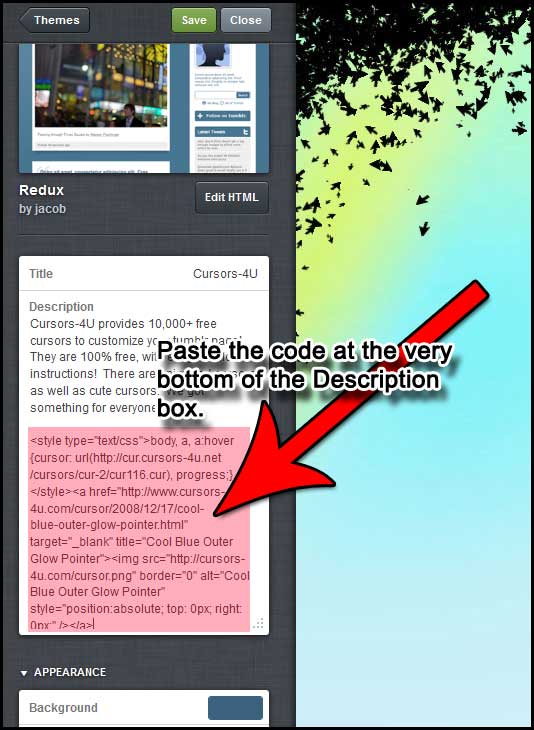
  3. Under "Description", paste the following code at the very bottom of your description box.

downloadTumblr Cursors Option #3

If the other two options do not work,
  1. Login and go to your Tumblr page.
  2. Click on Customize
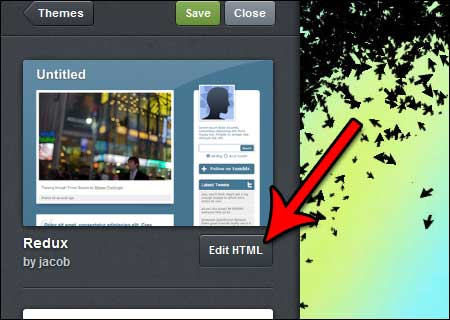
  3. Click on Edit HTML
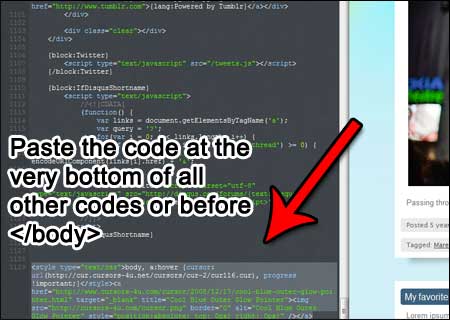
  4. At the very bottom paste the following code.
  5. At the top click on "Update Preview". Did the cursor show? If not leave a comment.
  6. If the cursor is there, click on "Appearance" then click on "Save".

downloadOld Blogger/Blogspot Interface

The Saradomin Godsword - RuneScape cursor will work if you are using the old interface for blogger/blogspot and if you follow the instructions below...
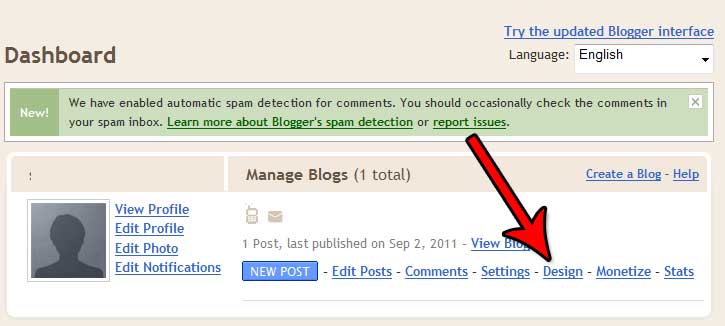
  1. Log in and go to your account dashboard.
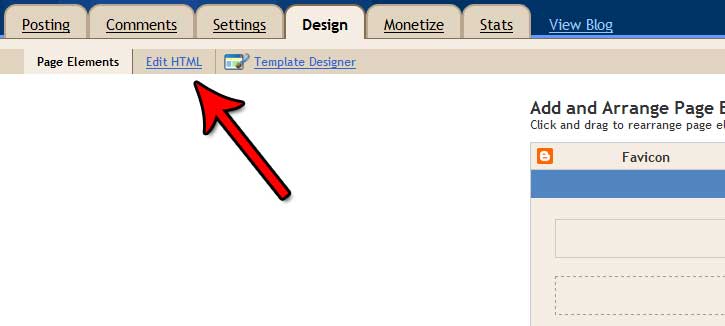
  2. Click on "Design"
  3. Next click on "Edit HTML"
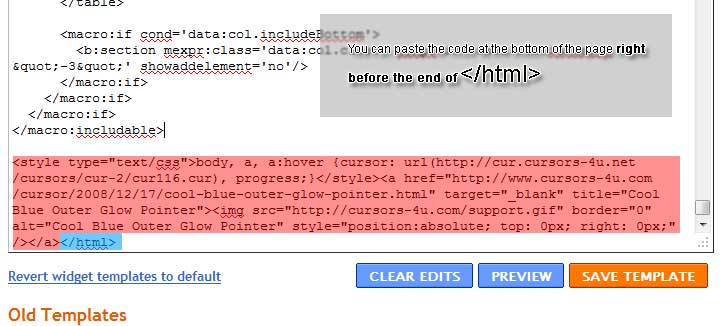
  4. Next paste the below code at the bottom of the html box.

  5. Save Your Profile

downloadNew Blogger/Blogspot Interface

The Saradomin Godsword - RuneScape cursor will work if you are using the new interface for blogger/blogspot and if you follow the instructions below...
  1. Log in and go to your account dashboard.
  2. Click on "Template"
  3. Next click on "Edit HTML"
  4. Next paste the below code at the bottom of the html box.

  5. Save Your Profile

downloadFacebook Cursor

Facebook does not allow CSS styling on their website. You have to use an external application that will modify your page for you. There is no such application except CursorMania. However CursorMania was not design as a facebook application but a general desktop toolbar Application. CursorMania may have a Saradomin Godsword - RuneScape in their system. But I am not positive.

Facebook Saradomin Godsword - RuneScape

If anyone has a Facebook application they want to share with us or develope for us. Send us an e-mail. Thank you.
On 29 May 2010 - 23:54, R I P Wrote:
wherer can i find a ags
On 29 May 2010 - 22:13, ugandajimmy Wrote:
well it does not work for me
Reply By Tor (Admin):
What doesn't work for you? Which part are you stuck on? Did you read our "HELP" page?

http://www.cursors-4u.com/fatp/faq.php
On 24 May 2010 - 03:24, Alison Wrote:
Honestly WHO COULD ACTUALLY LIKE THIS IT IS GROOOOOOOSSSSS speaking as a girl i think it is grosss
On 15 May 2010 - 14:57, matthew Wrote:
everyone once you download the cursor go to start at left bottom then control panel then search mouse and change settings then go to where you saved the cursor at then apply and enjoy
On 13 May 2010 - 23:48, James Wrote:
Meh wheres AGS
On 12 May 2010 - 03:31, hi Wrote:
omgggggg it works!
On 9 May 2010 - 02:26, king of land of bungholez Wrote:
i am michael just changed name and i dont know where to fuckin go to click on the help button
Reply By Tor (Admin):
Top of the page...it says "HELP"
On 8 May 2010 - 22:35, SOmeone Wrote:
Thanks a cursor that actuley works ty so muchhhhhhhhh !
!
On 25 Apr 2010 - 12:46, cartermcg1 Wrote:
once you download a cursor to apply it you need to go to control panal and search mouse hit change pointer looks chose the type of pointer then hit browse and select your resent download from here
On 22 Apr 2010 - 18:15, bmann Wrote:
wow just give me the cursor it only works here like really
Reply By Tor (Admin):
Did you click on download and apply it to your mouse settings? Read our HELP page.
On 28 Mar 2010 - 06:33, marc Wrote:
i don t see mouse panel by start
Reply By Tor (Admin):
Click on "Start" then go to "Control Panel" The go to "Mouse"
On 13 Mar 2010 - 11:35, kody Wrote:
iam pissed the fucking hell off becouse this fucking curssur only works on this web page and doesnt work on any other mother fucking pages u fucking ass holes
Reply By Tor (Admin):
Dude. If it only works on this page, how come it loaded on this page http://www.myspace.com/cursors_4u What website are you trying to paste it on?
On 12 Mar 2010 - 22:03, jayden Wrote:
wtf how do u get this association thingy upiv got it saved but omfg
Reply By Tor (Admin):
Read our help page. There's clear instructions on how to set it up. You can't open a cursor file because you don't have an editor that can view it. You can see it though, by changing your default mouse in control panel > mouse settings, which our Help page guides you through.
On 26 Feb 2010 - 17:56, jake Wrote:
wtf this isnt letting me open it
Reply By Tor (Admin):
Because you don't have the right program. Why are you opening it? Cursors don't need to be open. Just go to control panel > mouse and install it. Read our help page for more info.
On 25 Feb 2010 - 10:25, blzezard2 Wrote:
how do you apply this cursor to runescape if you could reply asap that would be great thanks
Reply By Tor (Admin):
1 log on
2 click on your tool icon
3 click on the graphic button
4 there will be a thing that says custum mouse
5 turn it off and your cure will work
On 27 Jan 2010 - 20:00, corey Wrote:
this sgs is awesome lmfao im kidding its realy gay
On 23 Jan 2010 - 18:57, dude ur on fire Wrote:
what do i open it with
On 23 Jan 2010 - 18:49, dude ur on fire Wrote:
how do i uplpad it
On 23 Jan 2010 - 13:27, awsomekickass Wrote:
how much does this cost
On 16 Jan 2010 - 15:14, james Wrote:
hey i just want 2 say thanks tor your step by step guide helped now i have a awsome godsword as cursor thanks again
On 28 Dec 2009 - 18:28, lee Wrote:
wow thx i got it to work for runescape go to the graphics settings and change custom cursors to off and it should work
On 6 Dec 2009 - 13:05, tense Wrote:
hey windows wont open the file and when i click open it takes me to a page that wont download anything or help me can u help me
Reply By Tor (Admin):
It won't open anything because you don't have the right program to open a cursor file. If you want to use it as your default computer cursor, read the comments below. I already gave some instructions or read our "HELP" page.
On 21 Nov 2009 - 17:40, daz Wrote:
mike add me on msn xdarren98x hotmail co uk and i send u pic and follow them to geet okk
On 14 Nov 2009 - 07:22, Narutomike77 Wrote:
How do you get the cursor to work on runescape
On 14 Nov 2009 - 07:15, Andrew Wrote:
Wicked I love it Looks great
download Leave A Comment
Name:
E-mail: (optional)
Web Address:

(Maximum characters: 200)
You have characters left.


template template
Latest Comments
 

Welcome To Cursors-4U.com Version 3.5

So you came looking for cursors and graphics eh? Cursors-4u.com gots plenty of cursors for your mouse pointer. We got runescape, world of warcraft, pokemon, naruto, twilight, cute, animated, cool, glitter, sexy, and so much more cursors. You can directly download the cursors for your mouse or web site to your hard drive for free and use them on your desktop computer for Windows XP or Windows Vista or Windows 7 or Windows 8 or you can place them on your web site or blog. You can even get Tumblr Cursors, Friendster Cursors, Blogspot Cursors, Xanga, Bebo, Orkut, Wordpress, Myspace and any other social networking profile site that allows CSS coding, here. Also our cursors work on Internet Explorer, Mozilla Firefox, Safari, and Google Chrome.

We were the first cursor site to allow cursor hot linking and cursor download. There have been many imitators since but you will not see the quality and quantity like here at Cursors-4U.com.

© 2005-2011 Cursors-4U.com. All Rights Reserved. All Trademarks And Copyrights Held By Their Respective Owners.