Thanks mannnn!!! Really helped, been wanting to change this little cursor 4ver!!!!!!! thanks!!!
I've tried everything, nothing seems to work it keeps saying Windows cannot support this file without a valid program please help!
how can i use it in windows 8
For all those that had the admin thing pop, do this this.
Save the file to the Documents folder and then move it to the destination folder
1)Save the file to the Documents folder.
Right-click the file that you saved and then click Cut.
2)Paste it in the cursors folder.
3)Type the administrator password if required.
From there do what it says in the article.
Worked for me :)
I don't understand how u save it and it said you don't have permition to save stuff in this folder??? :'(
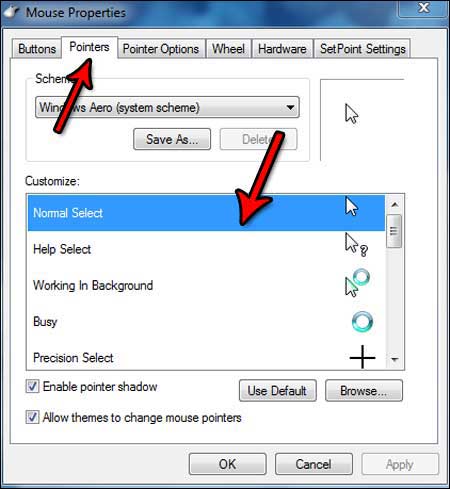
i dont have "allow themes to change pointers" as one of the option. i only have enable pointer shadow...help me!
thanks from spain!!! i have a new cursor :D this is a great website
HIIIYA. ^W^ With your help I was able to install some cursors!! Thankiesss!! <3
thank you very much :D
Awesome tutorial, now I know how! Yipeeeeeeee! Windows 7 is the best
woooowwww...it's a nice cursor and helpful explanation 4 customizing cursors..tq so much..:)
thankyou! its work!
THANK YOU! NOW THAT ANSWERS ALL MY QUESTION BOUT THIS :D YIPEEEEH!
Hi, umm i tried saving my cursor (which i downloaded) in the cursor folder and it said it needed permission. what does that mean?? And im the admin of my computer.
Thank you SOOOOO much!
this is the best tutorial I've ever followed.. clear and easy to follow :)
hiiiiiiii
thnx for the tuto..it's cool..n nice..!!
10/10 Amazing guide! helped me alot. Thanks now i can use this cool mouse pointer
this is a great website
good
Thank you! I now have a great new cursor set!
Hi
I have managed to get one of your cursors from cursors-4U.com.
I have also managed to get it installed with the help of your very nice guidelines.
Here is the problem:
When i make a reboot and the computer starts up again, my cursors are back to the same windows standard it always was.
When i thereafter check the settings under controlpanels->mouse, it looks exactly the way it is supposed to for using the new cursor. Still it continues to look as the windows standard.....
I hope you can help...
Reply By Tor (Admin):
You saved the cursors in the c:drive > windows > cursors folder right? If you did and it still reverts back to the normal one, try this. Get back into the mouse properties window. At the bottom it should say "Allow themes to change mouse pointers" Uncheck that and see if it helps.
If that doesn't work, this third option might work. Try saving the scheme as something new. In the same mouse properties windows, right under "Scheme" click the "Save As..." And save it and click Okay or Apply. Good luck.
Umm... Got a problem. Can't access control panel even though I AM the admin on this computer and theres no other user...
Reply By Tor (Admin):
Hmmm...I'm not really sure what do here. Sorry.
Awesome tutorial, now I know how! Yipeeeeeeee! Windows 7 is the best!